
Enterprise configuration
Organization Settings
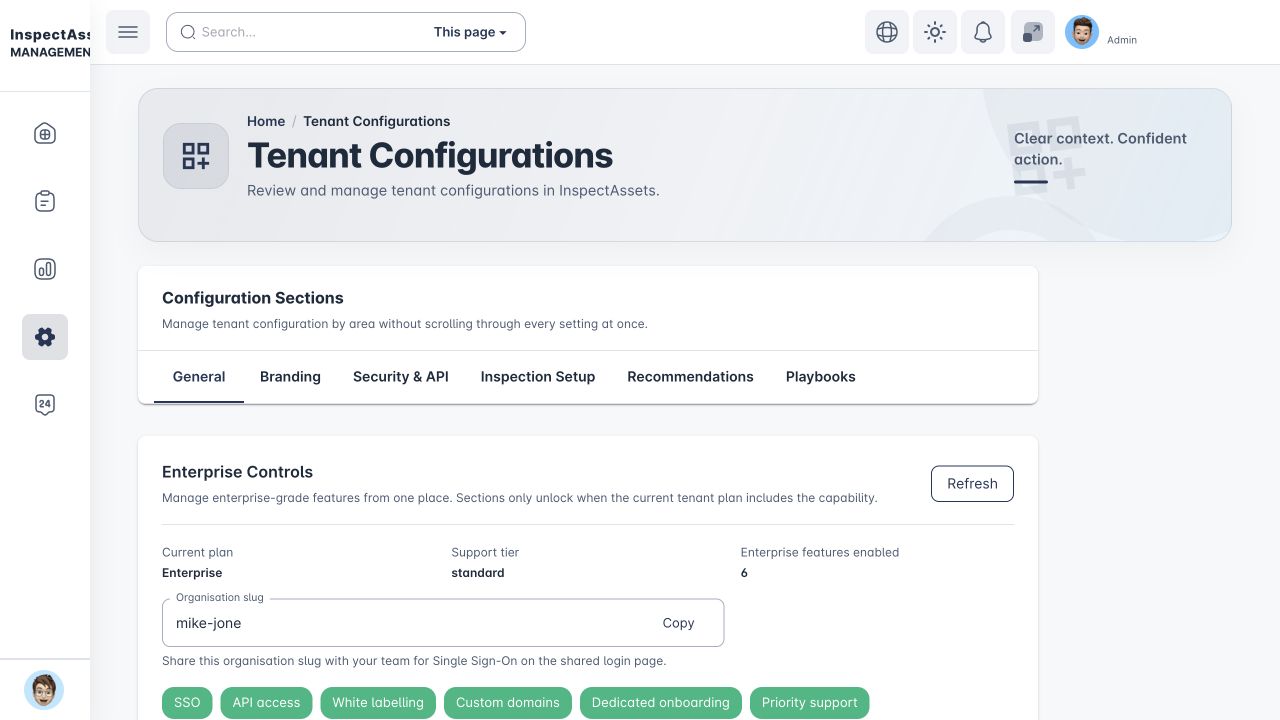
Configure the organisation structure, legal entities, billing relationships, identity, branding, APIs, operational playbooks, inspection setup and onboarding controls used across the tenant.
Requires an organisation-administration permission such as manage_tenant_settings, create_tenant, manage_tenants or permitted administration scope
Central controls
Organization Settings affects more than the current user. Changes here can alter how sites are structured, how people sign in, which brand customers see, how integrations authenticate and how billing relationships are documented. Treat configuration changes as controlled administration.
Settings areas
The tenant configuration is organised into areas such as General, Branding, Security & API, Inspection Setup and Recommendations and Playbooks. Enterprise controls and organisation/billing structure are presented alongside these configuration areas when enabled for the tenant.
Organisation, Legal Entities & Billing
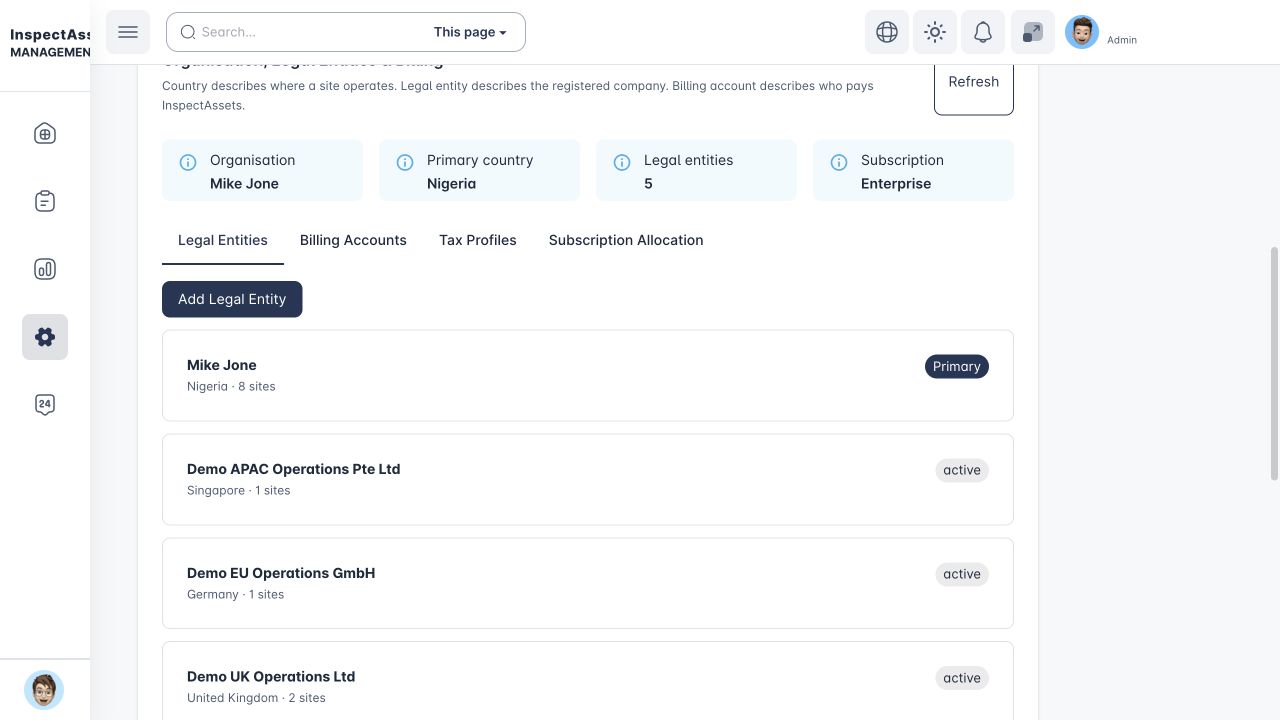
This panel models the commercial/legal structure behind the site portfolio. The key distinction is:
The top summary shows the organisation, primary country, number of legal entities and current subscription.
Legal Entities
Authorised administrators can create registered-company records with legal/trading names, registration country/number, tax/VAT registration information and a default currency. A primary legal entity can be identified where appropriate.
Billing Accounts
Billing accounts are tied to a legal entity and describe who pays. The record can include account name, billing country, currency, billing email and tax handling. Billing accounts are separate from the physical site so one payer can support the appropriate commercial structure without changing site geography.
Tax Profiles
Tax profiles can be attached to a legal entity or apply organisation-wide and can include country, tax type, rate, treatment and effective date. Available treatments can include standard, zero-rated, exempt, reverse charge, no tax and custom handling.
Configuration is not tax advice
Tax settings tell InspectAssets how to handle configured billing logic. Your finance/tax team should confirm which treatment and rate are legally appropriate.
Subscription Allocation
The tenant subscription remains the runtime entitlement boundary. Subscription Allocation documents which payer/legal-entity coverage applies to that subscription; it does not create independent feature entitlements simply because multiple legal entities exist.
White labelling and branding
Where your plan permits it, brand configuration can include brand name, support email, primary/secondary colours, sender/reply-to information, logo, favicon and login message. Review the result across sign-in, notification and application surfaces before considering the branding change complete.
Single sign-on (SSO)
SSO configuration supports organisation identity providers such as Microsoft Entra, Google Workspace, Okta, Auth0 and other compatible OIDC configurations. Provider-specific fields can include tenant/directory ID, hosted domain, organisation domain or authorization-server information.
Controls can include allowed email domain, automatic account linking, enforced SSO and whether local login remains permitted. Save the provider configuration, test it, then enforce it only after the expected users can sign in successfully.
Test before enforcing SSO
Enforcing a misconfigured identity provider can lock normal users out. Keep an approved recovery/admin path available while validating the configuration.
Tenant email / SMTP
When supported, the tenant can send system email through its own SMTP configuration instead of the default service. Enter host/credential and sender details carefully and use the configured admin notification address for delivery issues.
Tenant API keys
Use Security & API → Tenant API keys to create a server-to-server key for an approved integration. Choose only the scopes that integration needs, copy the key when it is created, and send it in the X-API-Key request header. The integration base path is /v1/api/integration.
Read and write scopes are separate for sites, assets and inspections. Report and audit-log access use their own read scopes. Rotate a key when its secret needs to change and revoke it when the integration should no longer connect.
The full API key is shown once
Store the key in the receiving system's secret store when you create or rotate it. InspectAssets keeps the key record and prefix, but does not show the full secret again.
Outbound operational webhooks
Use Security & API → Outbound operational webhooks when another system needs to receive selected InspectAssets events. Add a public HTTPS endpoint, choose the events to send, then copy the signing secret shown after creation.
Use Test to send a test delivery before relying on the webhook. Deliveries shows recent delivery status, attempt count, HTTP response status and any delivery error. Failed or dead-letter deliveries can be queued again with Retry.
You can temporarily disable a webhook without deleting it, rotate its signing secret when required, or revoke it permanently. A revoked webhook no longer sends events.
Operational Playbooks
The dedicated Playbooks guide is available to accounts with playbook access even when Organization Settings is unavailable.
Users with playbook access can open Operational Playbooks from the main tenant menu. Tenant administrators can also reach the same playbook panel from Organization Settings → Playbooks. A playbook automates approved operational responses to existing InspectAssets lifecycle events and contains a trigger, optional conditions and one or more controlled actions. New playbooks should be reviewed before they are enabled.
Supported triggers cover inspection completion/approval, limitation creation/overdue/resolution, corrective-action creation/completion/verification and condition-event opening/resolution. Conditions evaluate documented event fields such as severity, asset ID or owner. They do not run arbitrary code or SQL.
Controlled actions can notify tenant users, assign supported work, escalate management attention, create a follow-up inspection, create a work order or request corrective-action verification. The available action depends on the trigger context; for example, a follow-up inspection or work order requires an asset in the event context, and verification requests apply to completed corrective work.
Permissions and tenant scope still apply
view_playbooks allows authorised users, including default Manager and Supervisor roles, to open the standalone Operational Playbooks view and review configuration/execution history. manage_playbooks is required to create, edit, enable, disable or retry a failed execution. Action targets are validated against the same tenant before a mutation is made.
Execution history, failures and retries
The execution history records the playbook version/snapshot, trigger identity, action results, attempts and any failure message. Each trigger/playbook pair and each action position has an idempotency boundary so queue retries do not intentionally create duplicate actions. A failed execution can be retried by an authorised administrator after the underlying issue is corrected.
Automation is explicit, not inferred intelligence
Playbooks act on the factual lifecycle event and conditions you configure. They do not infer failure propagation, hidden risk or causal impact beyond the recorded event data.
Custom domains
Where enabled, administrators can add, verify, activate and remove custom domains. Complete verification before directing users to the domain, and maintain the DNS/ownership controls required by your organisation.
Dedicated onboarding
The onboarding area tracks implementation tasks and progress for a new tenant rollout. Use it to keep responsibilities visible across organisation configuration, people, site/asset data and go-live preparation rather than relying on informal notes.
Inspection setup and recommendations
Organisation-level inspection configuration influences how future inspection work behaves. When changing template-related or recommendation settings, consider the effect on field teams and future records. Historical submitted inspections retain their own captured context rather than being rewritten to match later configuration.