Help & service
Support Tickets
Raise a support request with enough context to diagnose the issue quickly, then follow its status and SLA through resolution.
Before opening a ticket
Check whether the issue is access, data scope, subscription entitlement, unsynced field work or an actual application error. The FAQ & Troubleshooting covers the most common cases and can save a support round-trip.
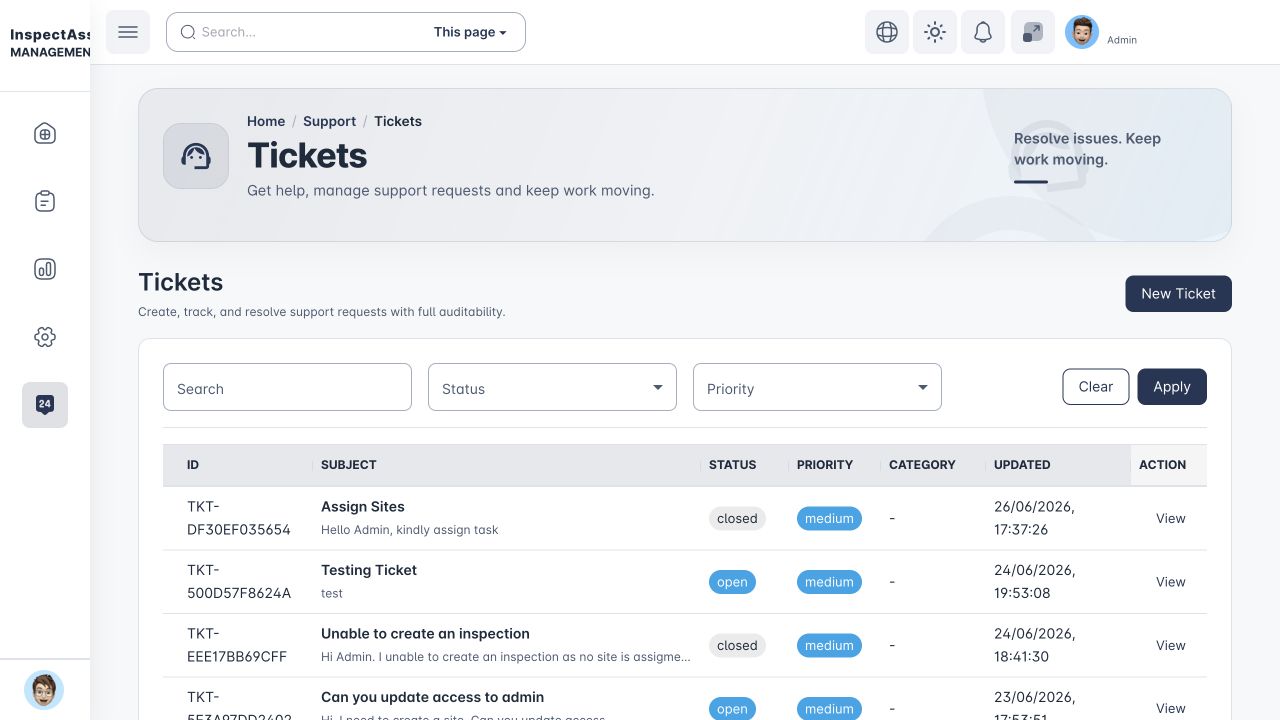
Support home
The Support area links self-service guidance and the ticket workflow. Tenant users can raise and track requests according to their access, and tenant administrators may have wider visibility across their organisation. Ticket investigation, assignment, internal notes, escalation and resolution are handled by InspectAssets platform support.
Creating a useful ticket
Creating requires support.ticket.create or the applicable tenant support-management capability
- State what you were trying to do and what you expected to happen.
- Copy the exact error message rather than paraphrasing it.
- Include the relevant site, asset, inspection, report or user context.
- Say whether the issue is repeatable and which steps trigger it.
- For field sync issues, state the Offline Queue status and avoid clearing device data.
- Do not paste passwords, MFA codes, private API secrets or bearer evidence links into a support ticket.
Ticket queue and SLA
The queue shows ticket status and, where configured, SLA risk/breach indicators. Open the ticket detail to follow the conversation and add new information. If the underlying issue changes materially, explain the change rather than opening duplicate tickets with conflicting context.
Ticket actions and scope
Ticket visibility does not automatically grant reply, internal-note, update, resolve or reopen authority. The ticket detail supplies the actions allowed for that record. Internal notes are distinct from customer-visible replies. If a control is absent, request the specific support capability rather than assuming that any support permission grants all ticket actions.
Account and MFA recovery tickets
If a tenant user has lost access to an authenticator app and cannot use a saved recovery code, create an MFA / Account Recovery ticket and identify the affected user. The ticket becomes the required audit record for any administrative MFA recovery.
Platform Support (Level 1) can investigate and escalate the request. A Platform Support Manager (Level 2) or Global Admin can perform the MFA recovery after the required security checks. The recovery code is sent only to the affected user's already-verified email address; support staff do not receive or view that code.
SLA Policies
Requires: support.sla.manage
SLA Policies define target response/resolution windows that drive the queue indicators. These controls affect support operations across the configured scope, so changes should follow the support team's agreed service policy.
What support will need for evidence/report problems
For an incorrect PDF, report or external evidence link, include the report type, relevant record IDs, filter/date scope and what content is incorrect or missing. Do not rely only on a screenshot of the first page; report correctness can include wrong report type, pagination, blank pages, permission leakage or historical/current content being mixed.