Operational Workspace
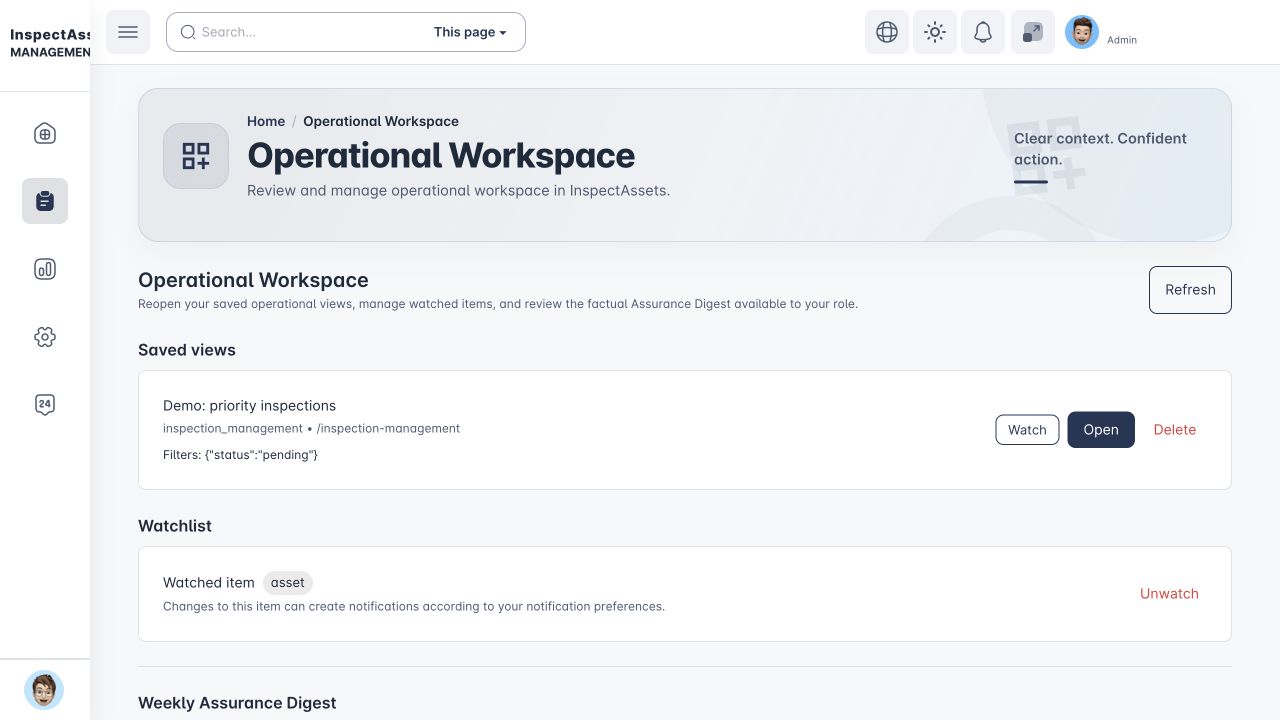
The Operational Workspace keeps your own frequently used operational filters, watched records, and weekly assurance summary together without changing the underlying inspection, asset, corrective-action, condition or compliance records.
Saved operational views
On supported operational pages you can save the current filter definition with a name. Saved views are private to your user account inside the active tenant. Reopening a saved view reapplies the saved filters to the current data, so the records shown can change as the underlying operational records change.
- Use Save current to store the current filters.
- Select a saved view and choose Open to reapply its filters.
- You can rename or delete your own saved views.
- Deleting a saved view does not delete any inspection, asset, finding or corrective-action record.
Watch and unwatch
Watching is optional. Supported assets, corrective actions and saved views can be added to your personal watchlist. When a supported factual lifecycle event matches a watched item, InspectAssets can create a watched-item notification according to your notification preferences.
Use Unwatch when you no longer want watch behaviour for that item. Unwatching does not change the underlying record.
Watch notifications
Watch notifications describe the operational event that InspectAssets recorded, such as a corrective-action or inspection lifecycle change. Replayed processing of the same event is deduplicated, so the same governed change should not create uncontrolled duplicate alerts.
You can control the available notification channels from Notifications & Profile under Watched Item Changes.
Weekly Assurance Digest
The Weekly Assurance Digest expands the existing weekly-summary preference into a role-aware operational summary. It uses the permissions and team scope of the recipient to decide which governed sections are available.
The digest can include inspection activity, inspection limitations, corrective actions, condition events and compliance requirement status when those sources and permissions are available. The time window is stated explicitly.
The scheduled digest continues to use the Weekly Assurance Digest notification preference. If both email and in-app channels are off, no scheduled digest is delivered through those channels.
What different roles see
The digest is permission-aware rather than a fixed report for everyone. Managers and supervisors can receive information within their authorised tenant/team scope. Inspectors receive only the sections their permissions allow. A section that the user is not authorised to access is not added merely because it exists for another role.